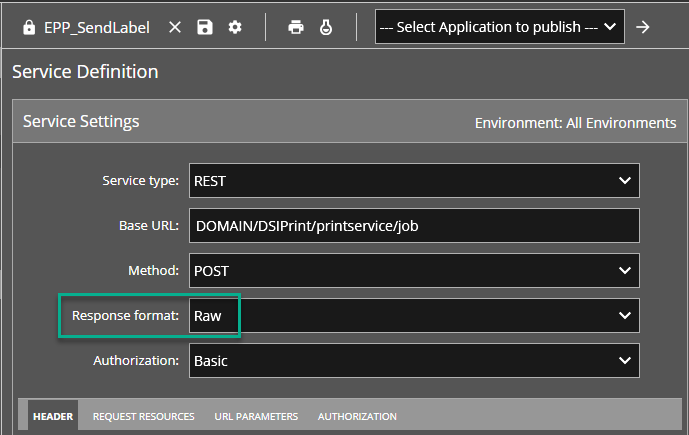
EPP 10.0.1.0 (and later) has introduced an update to ‘printservice/job’ API calls, which will now return the print job ID generated for successfully submitted print requests. The print job ID is returned as a simple string, not in XML or JSON format. In previous EPP versions, the API call would not respond with any details unless the print request was invalid.
Many MEP customers may be utilizing Service Definitions, like the Professional Services produced ‘EPP_SendLabel’ SD, that leverages the EPP endpoint to send print requests through API calls.
After upgrading to EPP 10.0.1.0 and later builds, the EPP_SendLabel calls, in the MEP Transaction Workbench page, may start producing the following error message:
“Check if the Response Format setting in the Service Definition matches the expected response output type (JSON/XML/Binary). Data at the root level is invalid. Line 1, position 1.”
The default ‘Response format’ for the EPP_SendLabel Service Definition is set to expect “XML”, which is why the above error will occur. It used to work fine with “XML” because there wasn’t response data being passed in previous EPP versions; having response data that is not in XML format is just confusing the platform.
Solution
To resolve this:
-
Edit the EPP_SendLabel Service Definition
-
Change the ‘Response format’ to “Raw”
-
Check-in the edit
-
Check-Out / Check-in any applications that use the EPP_SendLabel Service Definition
-
Republish any apps that reference the EPP_SendLabel Service Definition