I would like to turn on the option of ‘use wildcard search’ in the main menu - but this option isn’t on the screen. (using version 24.2.09) As I change into diff environments, sometimes the option is there other times it is not. Would like to know how to activate it.
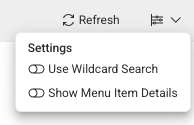
It appears this feature was introduced in the 25.1 release and is not available in 24.2. In 24.2, you can prefix your search with the * character to get similar results.
Thank you! will wait for 25.1 then 
Is this possible: An intake request to determine if it is possible for us to make the wildcard search the default? Today users can use it but have to customize it. We are looking to see if we as Cox can make the wildcard search the default setting for Search?
cc. @ian.p


In your environment’s User Interface Settings record (found in Tenant Environment Setup under Environment - UI Setting), there is a Navigation Menu Search Behavior option that controls that.