I tried to find a way to undo changes as an editor in the Logic Block Builder but had no luck. Is it possible though?
Unfortunately there is no way to undo changes in Logic Builder. Obviously refreshing the record will wipe any unsaved changes, but as it stands currently, there is no mechanism to undo your last edit.
There is an ability to view recent changes. While there isn’t a means to undo actions a user has taken within logic block builder since the last save, there is a concept of logic block Versions.
If you navigate to the logic block actions menu on the left pane and select “Compare Logic Blocks” section, you can select “Load/Refresh Versions” to load a list of different versions of this logic block. Each of these contains the date it was applied and viewing one can display the logic as it stood at that time.
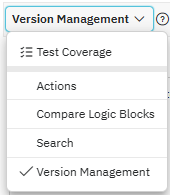
Once you’ve loaded versions, compare the live version to a previous version of the logic. Using the compare tool, it is possible to see the exact differences side-by-side and revert individual actions using the Merge Actions provided.

While this isn’t an exact undo, it is possible to make changes to a logic block, test, and then revert without worrying about saving a copy.
Ah, ok; at least I can go back to some history to see what the differences in code against live one. Thanks. In the future, will you be enhancing to support undo/redo?
We are tracking a feature request to build this functionality, but I couldn’t say when or if it will become available.
If you are a Nextworld customer or partner, you can work with your system administrator to submit an official enhancement request and gain some more visibility into whether this feature is planned.