Is there a way to see, or capture, the ZPL code of a label that is sent to a Zebra printer. Does EPP store it on the server anywhere? I am testing a label change and want to see the ZPL instead of physically printing the label every time.
Hi James,
Yes, you can see the print data that EPP produces from either the EPP ‘Print > Printer and Job Monitor’ page, OR from the ‘Print > Reprint’ page.
From the Printer and Job Monitor page, you can double click on any print job and select the ‘Print Job Data’ tab to see the ZPL data, for one of your Zebra label prints.

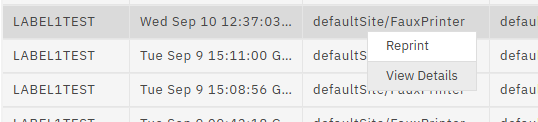
The EPP Reprint page has a similar window available by right-clicking on print job search results and selecting ‘View Details’.
For Zebra ZPL label data, you can use Labelary ZPL Viewer to preview an emulation of the ZPL label output. While not always a perfect representation, it can be helpful for quick label troubleshooting.
Perfect.. That gave me the information I needed.
Thanks!!!