EPP 10 stores and utilizes print request history in a database table, for print job management, Dashboard printing status counts, Printer and Job Monitor print job tracking, and Reprint searches & resubmissions. The print request history records include details like when the request was created/processed/completed, what parameters were included in the request (label, printer, quantity, variables, etc), the data sent to the printer(s), and other details.
The print request records are stored in the postgreSQL, EPP database, ‘eppPrintJobContainer’ table.
Letting this table grow indefinitely can lead to postgreSQL and EPP performance degradation. Mileage may vary, based on throughput, system specs, and EPP build version, but we generally recommend keeping the eppPrintJobContainer records count below 200,000. Maintaining this database table is part of standard EPP 10 server maintenance, and should be checked and trimmed every so often.
Manually Managing Print History
The pgAdmin[1] utility can be used to easily query the EPP 10 database, hosted by the postgreSQL server.
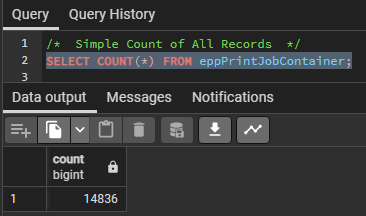
Getting an initial record count of the eppPrintJobContainer can help determine if the EPP 10 print history needs to be cleaned up a bit. Below query example will count the number of records in the entire eppPrintJobContainer table.
For EPP 10.0.0.0 - 10.0.1.4
/*  Simple Count of All Records  */
SELECT COUNT(*) FROM eppPrintJobContainer;

/*  Simple Count of All Records with Comma Formatted Number  */
SELECT to_char(COUNT(*), 'FM9,999,999') FROM eppPrintJobContainer;
For EPP 10.1.0.0 - 10.2.x
/*  Simple Count of All Records  */
SELECT COUNT(*) FROM upgraded.eppPrintJobContainer;

/*  Simple Count of All Records with Comma Formatted Number  */
SELECT to_char(COUNT(*), 'FM9,999,999') FROM upgraded.eppPrintJobContainer;
Example results:

Print Job Container Cleanup
Deleting/purging old print job records is a simple task that can be performed from the pgAdmin* utility.
Below example will remove all print records created before June 1st, 2023.
/*  EPP 10.0.0.0 - 10.0.1.4  */
DELETE FROM eppPrintJobContainer WHERE datecreated < '20250701';

/*  EPP 10.1.0.0 - 10.2.x  */
DELETE FROM upgraded.eppPrintJobContainer WHERE dateTimeAtCreation < '20250701';
Print Job Container Analytics
Other queries can be used to get estimates on how many print requests EPP receives on average, to help weigh how often old records should be purged, to maintain optimal system performance.
Counting print jobs created each month:
--  EPP 10.0.0.0 - 10.0.1.4  --
/*  Count All Records, Grouped by Month:  */
SELECT to_char(dateCreated, 'YYYY-MM') as Month,
to_char(COUNT(*), 'FM9,999,999') AS NumberOfJobs
FROM eppPrintJobContainer GROUP BY Month ORDER BY Month DESC;

/*  Count All Records in Range, Grouped by Month:  */
SELECT to_char(dateCreated, 'YYYY-MM') as Month,
to_char(COUNT(*), 'FM9,999,999') AS NumberOfJobs
FROM eppPrintJobContainer WHERE dateCreated BETWEEN '2020-01-01' AND '2025-09-30'
GROUP BY Month ORDER BY Month DESC;

--  EPP 10.1.0.0 - 10.2.x  --
/*  Count All Records, Grouped by Month:  */
SELECT to_char(dateTimeAtCreation, 'YYYY-MM') as Month,
to_char(COUNT(*), 'FM9,999,999') AS NumberOfJobs
FROM upgraded.eppPrintJobContainer GROUP BY Month ORDER BY Month DESC;

/*  Count All Records in Range, Grouped by Month:  */
SELECT to_char(dateTimeAtCreation, 'YYYY-MM') as Month,
to_char(COUNT(*), 'FM9,999,999') AS NumberOfJobs
FROM upgraded.eppPrintJobContainer WHERE dateTimeAtCreation BETWEEN '2020-01-01' AND '2025-09-30'
GROUP BY Month ORDER BY Month DESC;
Counting print jobs created each day:
--  EPP 10.0.0.0 - 10.0.1.4  --
/*  Count All Records, Grouped by Day:  */
SELECT dateCreated ::Date as DAY, to_char(COUNT(*), 'FM9,999,999') AS NumberOfJobs
FROM eppPrintJobContainer WHERE jobtype='NORMAL' GROUP BY Day ORDER BY Day DESC;

/*  Count All Records in Range, Grouped by Day:  */
SELECT dateCreated ::Date as DAY, to_char(COUNT(*), 'FM9,999,999') AS NumberOfJobs
FROM eppPrintJobContainer WHERE dateCreated BETWEEN '2025-05-01' AND '2025-05-31'
GROUP BY Day ORDER BY Day DESC;

--  EPP 10.1.0.0 - 10.2.x  --
/*  Count All Records, Grouped by Day:  */
SELECT dateTimeAtCreation::Date as DAY, to_char(COUNT(*), 'FM9,999,999') AS NumberOfJobs
FROM upgraded.eppPrintJobContainer WHERE jobtype='NORMAL' GROUP BY Day ORDER BY Day DESC;

/*  Count All Records in Range, Grouped by Day:  */
SELECT dateTimeAtCreation::Date as DAY, to_char(COUNT(*), 'FM9,999,999') AS NumberOfJobs
FROM upgraded.eppPrintJobContainer WHERE dateTimeAtCreation BETWEEN '2025-05-01' AND '2025-05-31'
GROUP BY Day ORDER BY Day DESC;
Counting print jobs created in a range by hour:
--  EPP 10.0.0.0 - 10.0.1.4  --
/*  Count All Records in Range, Grouped by Hour:  */
SELECT dateCreated ::Date as DAY, EXTRACT (HOUR FROM dateCreated) AS HOUR,
to_char(COUNT(*), 'FM9,999,999') AS NumberOfJobs FROM eppPrintJobContainer
WHERE dateCreated BETWEEN '20250515 08:00:00' AND '2025-05-15 18:00:00' AND jobtype = 'NORMAL'
GROUP BY DAY, HOUR ORDER BY DAY DESC, HOUR;

--  EPP 10.1.0.0 - 10.2.x  --
/*  Count All Records in Range, Grouped by Hour:  */
SELECT dateTimeAtCreation::Date as DAY, EXTRACT (HOUR FROM dateTimeAtCreation) AS HOUR,
to_char(COUNT(*), 'FM9,999,999') AS NumberOfJobs FROM upgraded.eppPrintJobContainer
WHERE dateTimeAtCreation BETWEEN '20250515 08:00:00' AND '2025-05-15 18:00:00' AND jobtype = 'NORMAL'
GROUP BY DAY, HOUR ORDER BY DAY DESC, HOUR;
Average monthly print jobs, each year:
--  10.0.0.0 - 10.0.1.4  --
SELECT Year AS "Year",TO_CHAR(AVG(MonthlyAvg),'FM9,999,999') AS "Monthly Average" FROM
(SELECT EXTRACT(Year FROM dateCreated) AS Year,EXTRACT(Month FROM dateCreated) AS Month,
COUNT(*) AS MonthlyAvg FROM eppPrintJobContainer GROUP BY Year,Month ORDER BY Year,Month) AS SQ GROUP BY Year;

--  10.1.0.0 - 10.2.x  --
SELECT Year AS "Year",TO_CHAR(AVG(MonthlyAvg),'FM9,999,999') AS "Monthly Average" FROM
(SELECT EXTRACT(Year FROM dateTimeAtCreation) AS Year,EXTRACT(Month FROM dateTimeAtCreation) AS Month,
COUNT(*) AS MonthlyAvg FROM upgraded.eppPrintJobContainer GROUP BY Year,Month ORDER BY Year,Month) AS SQ GROUP BY Year;
Automatically Managing Print History
In EPP 10.0.1.0 and later, an enhancement was added to be able to configure automatic purging of print records by ‘days to retain’ and selecting which job statuses are purged.
Once enabled from ‘Admin > System Configuration > Print Job Monitor’, the eppPrintJobContainer will be purged by EPP automatically. The print job purging is not enabled by default.
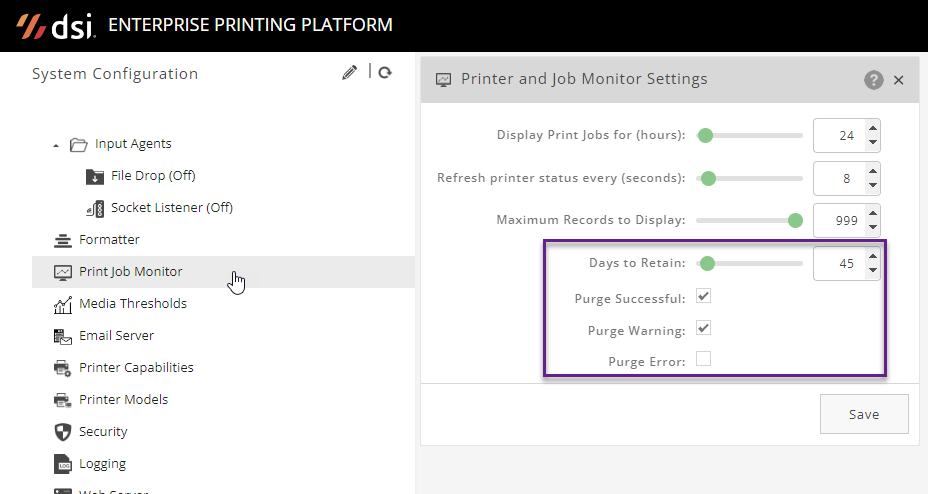
For records to be purged, you have to enable the check-boxes for the associated statuses.
-
‘Purge Successful’ - for jobs confirmed printed by their sources. Usually only applies to SOCKET printers that return a print completion status to EPP.
-
‘Purge Warning’ - for prints that were successfully routed to their destination (printer or print spooler) but EPP didn’t receive a label print completion status.
-
‘Purge Error’ - for print jobs that failed to be processed by EPP, usually due to invalid parameters or bad data.
Keeping print job records is primarily beneficial if using the EPP ‘Print > Reprint’ page, to reprint labels that have already completed, to any compatible printer.
You may not need to keep print records for much longer than you’d likely need to reprint or review status/details for a job that errored or completed.
PGAdmin is a postgreSQL database manager which is normally installed alongside the postgreSQL server installation (Windows) by default. PGAdmin is free and available for download and install most anywhere. ↩︎