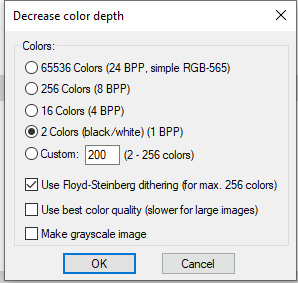
Many label printers won’t support most JPG, JPEG, or BMP images OR high color depths; even if the “color” image only contains black and white pixels. Most printers will work well with PCX graphic files, using 2 color depth (1 BPP) configuration.
The 2 color PCX graphics created with Irfanview has been one of the most consistently successful methods to acquire label printer compatible images for EPP label printing. Irfanview is an easy, free program for converting graphic files, using the ‘Image > Decrease Color Depth’ menu option.
Prerequisites
For PCX file exporting, you will need to install the Irfanview Formats plugin; also available on their site & easily added with their ‘All Plugins…’ installer/zip. There are 32 bit and 64 bit variations of the plugins, so be sure to select the same type used for your Irfanview installer.
Converting Graphics to PCX
-
Launch Irfanview
-
Open the image you want to convert
-
Select ‘Image > Decrease Color Depth’, from the menu bar
-
Change the color depth to “2 Colors (black/white) (1 BPP)”
-
Select OK
-
Select Save As
-
Set the ‘Save as type’ to “PCX - Zsoft Paintbrush”
-
Save the file